
Website speed optimisation is no longer just a technical improvement. It directly affects how people experience your website, how quickly they can interact with it, and whether they stay long enough to become a customer.
A slow website can make even a beautifully designed website feel unreliable. Large images, excessive JavaScript, poorly configured caching, third-party scripts, slow hosting and inefficient website builders can all contribute to performance problems.
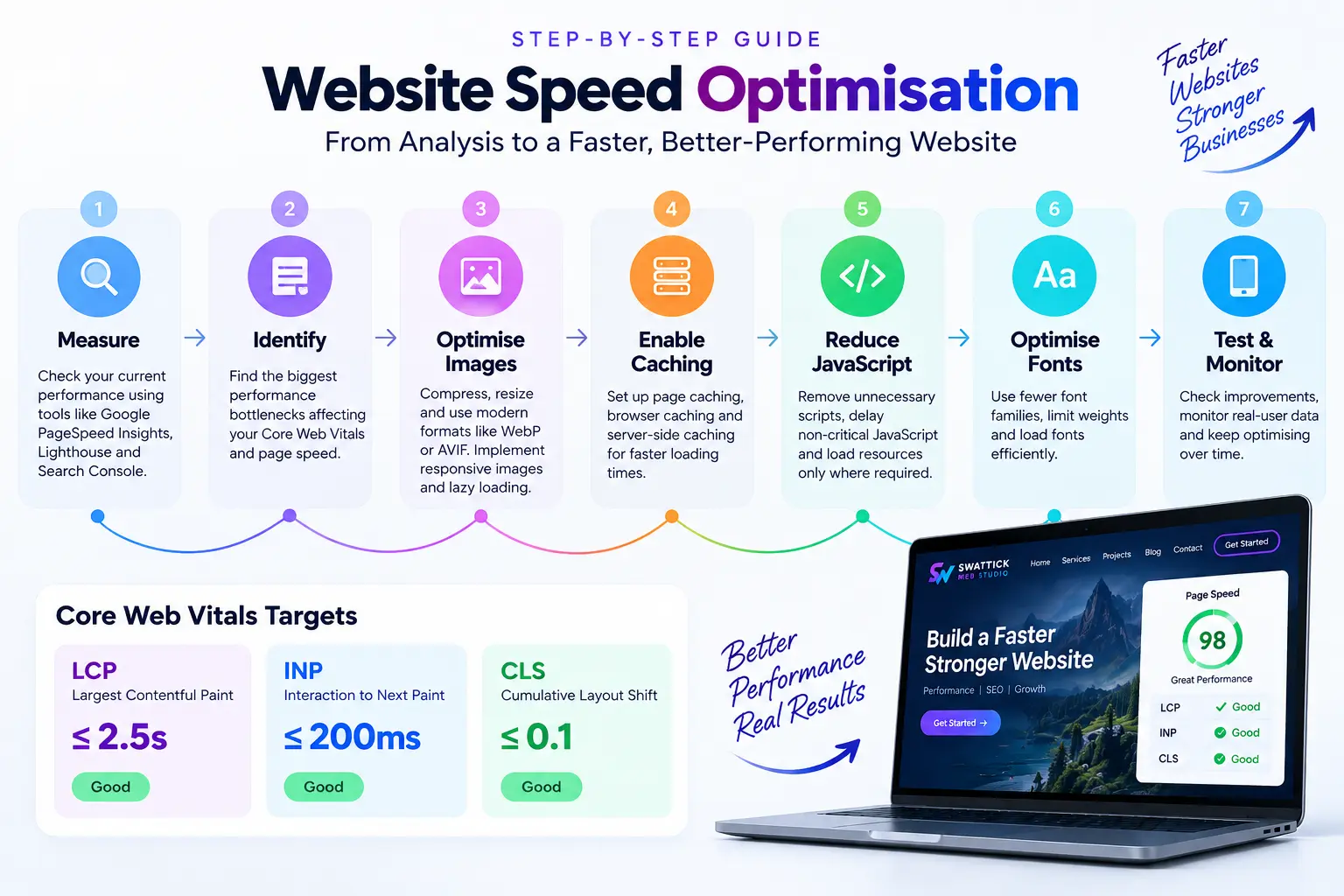
Google’s Core Web Vitals provide a useful framework for understanding real-world website performance. The three current Core Web Vitals measure loading performance, responsiveness and visual stability: Largest Contentful Paint (LCP), Interaction to Next Paint (INP), and Cumulative Layout Shift (CLS).
In this guide, we’ll look at what these metrics mean and the practical steps you can take to improve your website’s speed and performance.
What Are Core Web Vitals?
Core Web Vitals are Google’s user-focused performance metrics designed to measure important aspects of the browsing experience.
The three metrics are:
| Metric | What It Measures | Good Target |
|---|---|---|
| LCP | Loading performance | ≤ 2.5 seconds |
| INP | Responsiveness | ≤ 200 ms |
| CLS | Visual stability | ≤ 0.1 |
Google evaluates these metrics using real-user data, with the 75th percentile being the key threshold for determining whether a page provides a good experience.
1. Largest Contentful Paint (LCP)
LCP measures how quickly the main content of a page becomes visible.
For example, on a homepage, the LCP element might be a large hero image, heading or other prominent content.
A good LCP is 2.5 seconds or less. Anything above 4 seconds is considered poor.
2. Interaction to Next Paint (INP)
INP measures how quickly a page responds when users interact with it.
Clicking a menu, opening a dropdown, submitting a form or interacting with a product filter should feel responsive.
A good INP is 200 milliseconds or less.
3. Cumulative Layout Shift (CLS)
CLS measures unexpected movement of visible content while a page loads.
For example, imagine clicking a button just as an image loads and the button suddenly moves. That’s a layout shift—and repeated shifts create a frustrating experience.
A good CLS score is 0.1 or lower.
Why Is Website Speed Important?
Website performance affects much more than a PageSpeed score.
A faster website can provide:
- Better user experience
- Faster access to important information
- More responsive interactions
- Better mobile usability
- Improved conversion opportunities
- A stronger technical foundation for SEO
- Lower bandwidth consumption
However, there is an important distinction: optimising for a green PageSpeed score should not become the goal by itself.
Real users matter more than an arbitrary score.
Google recommends combining lab testing with field data because real-world performance varies depending on devices, networks and user interactions.
7 Practical Ways to Improve Website Speed
1. Optimise Your Images
Images are often one of the largest contributors to page weight.
Uploading a 4MB photograph when the website only needs a 300KB version creates unnecessary loading work.
Before uploading images:
- Resize them to the dimensions actually required
- Compress them
- Use modern formats such as WebP or AVIF where appropriate
- Avoid unnecessarily large background images
- Use responsive image sizes
- Lazy-load images that aren’t immediately visible
Google’s web performance guidance specifically highlights image optimisation, responsive images and efficient image delivery as important performance techniques.
Important: Don’t lazy-load your primary above-the-fold image automatically. If that image is the LCP element, delaying it can make LCP worse.
2. Use Caching
Caching allows frequently requested resources to be served more efficiently instead of being regenerated or downloaded unnecessarily.
A properly configured caching system can help reduce server processing and improve loading performance.
For WordPress websites, caching may involve:
- Page caching
- Browser caching
- Object caching
- CSS and JavaScript optimisation
- Image optimisation
- CDN caching
However, caching settings should be configured carefully. Aggressive optimisation can sometimes break layouts, scripts or interactive functionality.
The goal isn’t to enable every optimisation option available. The goal is to find the configuration that improves performance without compromising functionality.
3. Reduce Unnecessary JavaScript
JavaScript can make websites interactive, but too much JavaScript can also delay the browser.
This is particularly important for websites using multiple plugins, page builders, analytics tools, chat widgets, tracking scripts and third-party integrations.
Audit your website and ask:
Does this script provide enough value to justify its performance cost?
Where appropriate:
- Remove unused scripts
- Delay non-critical JavaScript
- Reduce unnecessary plugins
- Load scripts only where required
- Break up large JavaScript tasks
Reducing unnecessary JavaScript can improve both initial loading and responsiveness. Google’s performance guidance recommends reducing JavaScript work and improving how resources are loaded.
4. Improve Your Hosting and Server Response Time
Even a well-optimised website can feel slow if the server takes too long to respond.
Your hosting environment affects:
- Time to First Byte (TTFB)
- Server processing
- Database performance
- Traffic handling
- Resource availability
If your website consistently has a slow server response, investigate the hosting environment before endlessly tweaking frontend settings.
For growing business websites, better hosting can sometimes provide a larger performance improvement than adding another optimisation plugin.
5. Optimise Fonts
Custom fonts contribute to page weight and can affect how quickly text appears.
Try to:
- Limit the number of font families
- Reduce unnecessary font weights
- Use modern font formats
- Avoid loading fonts that aren’t actually used
- Consider efficient font-display strategies
Typography is part of your visual identity, but every additional font resource has a performance cost.
The best approach is to balance design consistency with performance.
6. Prevent Layout Shifts
To improve CLS, make sure the browser knows how much space important elements need before they load.
Common causes of layout shifts include:
- Images without defined dimensions
- Dynamically injected content
- Ads and embeds
- Web fonts
- Elements that appear after the initial layout
Google specifically identifies images and dynamically loaded content without reserved space as common CLS problems.
For example, reserving the correct space for an image prevents surrounding content from suddenly moving when that image loads.
7. Don’t Ignore Mobile Performance
A website that feels fast on a powerful desktop computer may feel completely different on a mid-range smartphone using a slower mobile connection.
That’s why mobile performance deserves particular attention.
Check:
- Hero image size
- Mobile font sizes
- Number of loaded scripts
- Animation complexity
- Third-party services
- Image dimensions
- Mobile layout shifts
- Server response time
Always test important pages on both desktop and mobile.
How to Test Your Website Speed
One of the easiest starting points is Google PageSpeed Insights.
It provides performance information and diagnostics for individual URLs.
You can also use:
- Chrome DevTools for detailed debugging
- Lighthouse for controlled lab testing
- Google Search Console for Core Web Vitals reporting
- Real-user monitoring when available
Remember that lab results and real-user results can differ. Lighthouse-style testing is useful during development, while field data provides insight into the experience actual visitors are having.
A Better Approach to Website Speed Optimisation
Don’t try to fix everything at once.
Start with the biggest problems.
A practical workflow is:
Measure → Identify → Optimise → Test → Monitor
For example:
- Run PageSpeed Insights.
- Identify the largest performance bottlenecks.
- Optimise the LCP element.
- Reduce unnecessary JavaScript.
- Optimise images and fonts.
- Fix layout shifts.
- Improve caching and server performance.
- Test again.
- Monitor real-user performance over time.
This approach is much more effective than blindly installing optimisation plugins or trying to achieve a perfect 100 score.
Final Thoughts
It’s a website that loads important content quickly, responds when users interact with it and remains visually stable while loading.
Core Web Vitals give website owners a practical way to measure these experiences through LCP, INP and CLS. But the best performance strategy combines technical optimisation with good design, efficient development, reliable hosting and continuous monitoring.
For WordPress websites especially, performance should be considered from the beginning—not treated as something to fix after the website is finished.
Good design gets attention. Good performance keeps people moving.
At Swattick Web Studio, I focus on building digital experiences where design, usability, WordPress development, performance and SEO work together—not as separate pieces.
If your website feels slow, struggles on mobile, or isn’t performing well in PageSpeed Insights, the right solution isn’t always another plugin. Sometimes the biggest improvement comes from identifying what’s actually slowing the website down.
Need help improving your website’s performance? Explore our Website Performance service or get in touch to discuss your project.